
Workflows, editor & runs
Author workflows with the dual DAG/YAML editor and the Architect, then run, monitor, approve, retry, and inspect them.
The dashboard gives you three surfaces for the full workflow lifecycle: the Workflows page (/workflows) to browse and manage definitions, the Workflow Editor overlay to author them in a synced DAG/YAML view with AI assistance from the Architect, and the Workflow Runs page (/runs) to launch, monitor, approve, retry, and inspect executions step by step. Every action on these pages is a thin client over the gateway’s workflow API, so anything you can do here you can also script — see Workflows & Architect API.
Use this page when you want to operate workflows visually. If you are writing the YAML by hand, start with Your first workflow and the Workflow YAML reference; for the run lifecycle in depth, see Runs, approvals & checkpoints.
Workflows page
Section titled “Workflows page”Open Workflows from the Orchestration section of the sidebar, or go directly to /workflows. The page lists every definition, renders a read-only DAG of the selected one, and exposes the create/run/edit lifecycle from a toolbar. Deep-link to a specific definition with ?workflow=<name_or_kref>.
Definitions are declarative YAML pipelines stored in Kumiho graph memory (space Revka/Workflows, item kind workflow) and executed by the operator-mcp backend — not in config.toml. Every save writes a new revision and tags it published, so history is preserved.
Selecting and reading a workflow
Section titled “Selecting and reading a workflow”- Workflow selector — a dropdown of every definition, each with a name and a version/steps badge. Pick one to load its DAG.
- DAG canvas (read-only) — the step graph with dependency edges. Click a node to open the step inspector.
- Step inspector panel — shows the selected step’s
role,agent_type,skills, and template name, with a link to open that step on the Runs page. - Tabs — switch between Definition (the DAG above) and Runs, which navigates to
/runs?workflow=<name>filtered to this workflow.
The page calls GET /api/workflows?include_deprecated=true&include_definition=false for the list, fetches each YAML on demand from GET /api/workflows/revisions/{*kref}, and reads GET /api/workflows/runs?limit=40 to show a run-count badge.
Lifecycle actions
Section titled “Lifecycle actions”The toolbar carries the full CRUD lifecycle. Each maps to one gateway call:
| Action | What it does | Endpoint |
|---|---|---|
| Execute | Trigger a run of the selected workflow | POST /api/workflows/run/{name} |
| Create | Open the editor overlay on a blank workflow | POST /api/workflows (on save) |
| Edit | Open the editor overlay on the selected workflow | PUT /api/workflows/{*path} (on save) |
| Duplicate | Clone into a new editable definition | POST /api/workflows (on save) |
| Deprecate | Soft-toggle the deprecated flag | POST /api/workflows/deprecate |
| Delete | Permanently remove the definition | DELETE /api/workflows/{*path} |
Creating, updating, deprecating, or deleting a definition also syncs cron jobs for it: a workflow whose YAML declares cron triggers registers cron jobs on save, and deprecating or deleting it removes them. See Variables, expressions & triggers.
Workflow Editor (full-screen overlay)
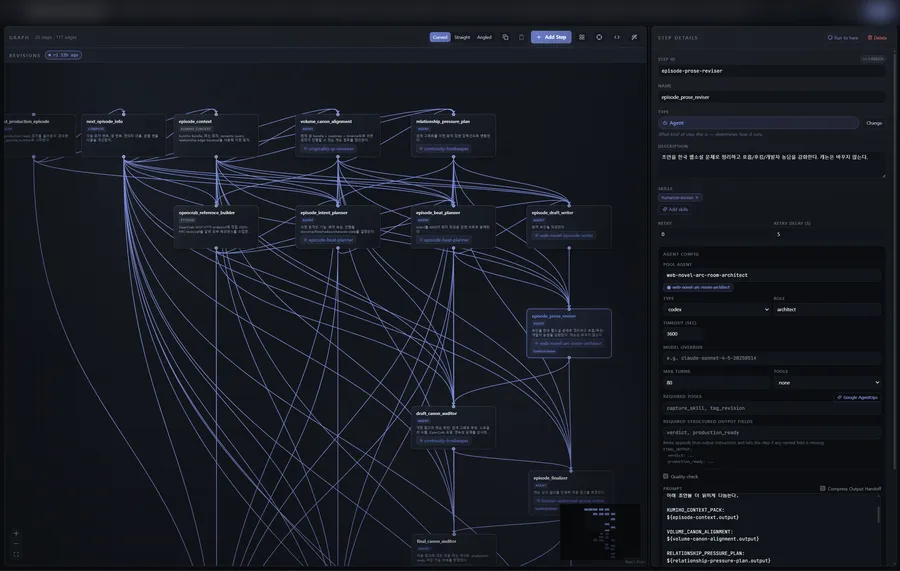
Section titled “Workflow Editor (full-screen overlay)”Clicking Create, Edit, or Duplicate opens the editor as a full-screen overlay. It edits the same workflow two ways at once — a visual DAG and a YAML document — kept in bi-directional sync, and adds an AI co-author (the Architect), a step palette, a per-step config panel, and a revision history strip.
The WorkflowDagWorkspace is an interactive canvas of custom step nodes and edges, with a minimap and TRUE/FALSE edge labels on conditional branches. Drag step types from the StepTypePalette onto the canvas — code, agent, shell, test, human_approval, gate, parallel, for_each, a2a, handoff, and more — then wire dependencies between them.
The YAML pane is a CodeMirror editor with YAML syntax support, command autocomplete for step directives (EditorCommandList), and expression textareas for step input/output. Edit the YAML directly and the DAG updates; rearrange the DAG and the YAML updates. Either pane is the source of truth at any moment.
Step configuration
Section titled “Step configuration”Select any node to open the StepConfigPanel on the right, where every field of that step type is editable. Steps that call out to a credentialed service get an AuthProfilePicker — a dropdown of auth profiles with an inline “New auth profile” modal. The picker is backed by:
GET /api/auth/profiles # list profiles for the dropdownPOST /api/auth/profiles # create a new profile inlineDELETE /api/auth/profiles/{id} # remove a profileAgent steps also draw their assignable roster from GET /api/agents?page=1&per_page=100.
The Architect (AI-assisted editing)
Section titled “The Architect (AI-assisted editing)”The Architect is a chat panel inside the editor. Describe the change you want in natural language (“add a review gate before publishing”) and the LLM edits the workflow live by calling its revise_workflow tool, which rewrites the YAML — and therefore the DAG — in place. Messages flow over the operator WebSocket session.
When the Architect emits YAML in chat instead of calling the tool, the editor falls back to posting that YAML to POST /api/architect/validate_yaml so it still passes schema and workflow-level checks before it reaches the canvas. The full Architect surface — propose, validate, list revisions, and revert — is documented in Workflows & Architect API.
Revision history strip
Section titled “Revision history strip”Along the editor runs a horizontal RevisionHistoryStrip listing the workflow’s past revisions. It is populated by:
GET /api/architect/revisions?workflow_kref=<kref>Click a revision to preview it; revert by republishing it as the current published revision:
POST /api/architect/republishContent-Type: application/json
{ "revision_kref": "kref://Revka/Workflows/daily-report.workflow?r=2" }
Republish never deletes anything — it re-tags an earlier revision as published, so the revert is safe and itself reversible.
Saving and validation
Section titled “Saving and validation”Saving serializes the current graph back to YAML and validates it before persisting. Validation runs the operator’s six-pass validate_workflow check (duplicate step IDs, dependency references, cycle detection, per-step config, variable references, and trigger fields); errors appear inline and block the save. On success the gateway writes a new revision, tags it published, and re-syncs cron jobs. For the rules in depth, see Workflow YAML reference.
Workflow Runs page
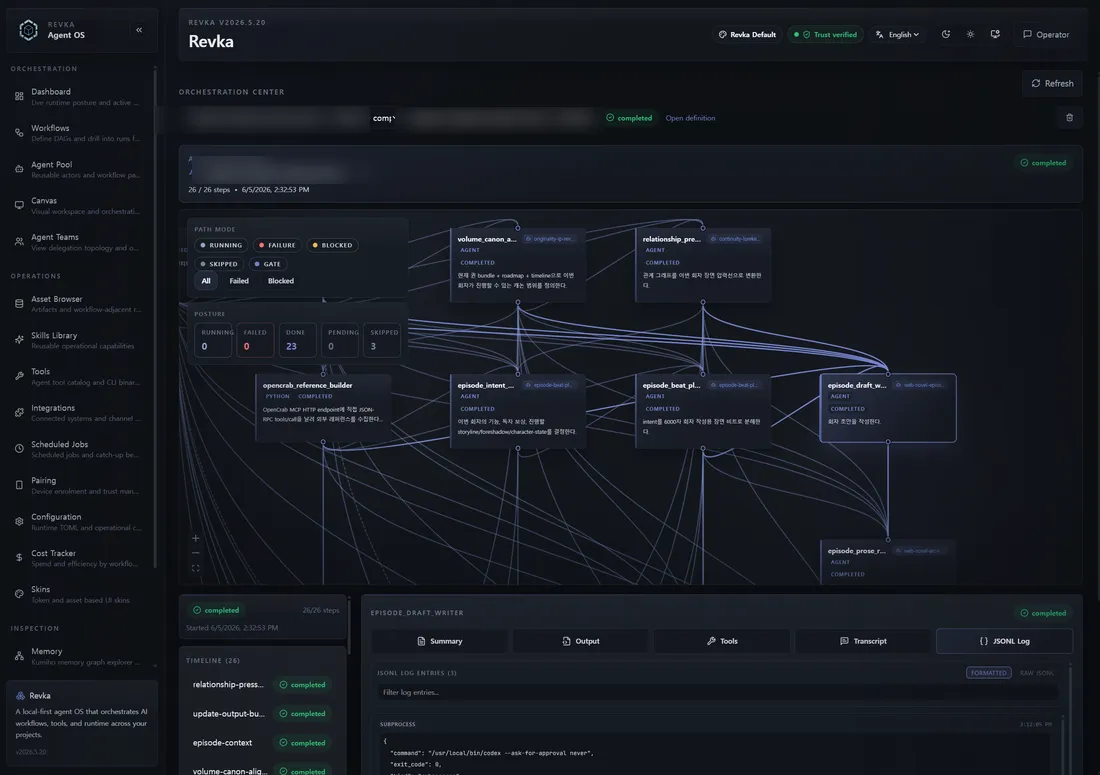
Section titled “Workflow Runs page”Open Workflow Runs from the dashboard (the “Open all runs” link on the overview, or the Runs tab on a workflow) or go directly to /runs. This is where you launch, watch, and audit individual executions. It shows a run list, a DAG with a per-step status overlay, a step inspector, an approval panel, dependency path highlighting, and an artifact viewer.
Deep-link with any of these query params:
| Param | Meaning |
|---|---|
?run=<run_id> | Open a specific run |
?workflow=<name_or_kref> | Filter the run list to one workflow |
?node=<step_id> | Pre-select a step in the run |
?path=all|failed|blocked | Set the path-highlight mode (see below) |
The page reads the run list from GET /api/workflows/runs?limit=25&workflow=<name> and the selected run’s full detail from GET /api/workflows/runs/{run_id}, then pins the displayed DAG to the exact YAML the run executed via GET /api/workflows/revisions/{kref} — later edits to the definition never rewrite a historical run’s graph.
Run statuses
Section titled “Run statuses”A run’s status pill is colour-coded. The states are:
| Status | Meaning |
|---|---|
pending | Created but not yet picked up by the executor. |
running | The executor is active. |
paused | Waiting at a human_approval or human_input gate. |
completed | All steps finished successfully. |
failed | A step failed; the checkpoint is preserved so the run can be retried. |
cancelled | Stopped by a user or the system. |
stale | Non-terminal status with no checkpoint and no live lock — for example after a redeploy wiped local state. |
for_each steps additionally show a loop progress label (x/total).
Step inspector tabs
Section titled “Step inspector tabs”Click any node in the run DAG to open the step inspector. It has five tabs:
- Summary — status, agent ID, role, template, output preview, and (on failure) a Failure Detail card with executor error,
output_data, stderr, and captured inputs. - Output — the step’s text output.
- Tools — the tool calls the step’s agent made: name, args, result, and status.
- Transcript — the agent’s full conversation for that step.
- JSONL Log — the raw activity log for the step’s agent.
The Tools tab is backed by the per-agent activity log:
GET /api/workflows/agent-activity/{agent_id}?view=summary&limit=50Approval panel
Section titled “Approval panel”When a step enters approval_required (a human_approval gate), the inspector shows an approval panel with Approve and Reject buttons and an optional feedback text box. Submitting calls:
POST /api/workflows/runs/{run_id}/approveAuthorization: Bearer <token>Content-Type: application/json
{ "approved": true, "feedback": "LGTM" }
The gateway atomically claims the approval from an internal registry before resuming, so a dashboard click and a chat-channel reply arriving at the same time cannot double-resolve the same gate. On resolution it broadcasts a human_approval_resolved SSE event so every open client updates.
Path highlight
Section titled “Path highlight”The path-highlight control (also set by ?path=) dims the DAG to a chosen subset so you can trace causality in a large run:
- all — every step, no dimming.
- failed — the chain of steps leading to the failure.
- blocked — the chain of steps blocked behind a pause or failure.
Artifact viewer
Section titled “Artifact viewer”Agent steps write their output to a Kumiho artifact rather than inlining it. Open the artifact viewer modal from a step to read the artifact body with syntax highlighting; it is fetched from:
GET /api/artifact-body?location=<uri>Authorization: Bearer <token>This is the recommended way to read large step output instead of scrolling the inline preview. The same artifacts are browsable from the Assets & memory explorer.
Run actions
Section titled “Run actions”Each run’s toolbar exposes the rest of the lifecycle:
-
Execute / re-run — trigger a fresh run via
POST /api/workflows/run/{name}. You can supplyinputs, an optionalcwdworking directory, andtarget_step_idto “run to here” (only the target step and its ancestors). -
Retry —
POST /api/workflows/runs/{run_id}/retry. Re-executes from the first failed step; successful step outputs are restored from the checkpoint, so only the failed step and its downstream steps run again. You can pass an optionalcwdoverride for the retry. -
Cancel —
POST /api/workflows/runs/{run_id}/cancel. Signals the executor to stop at the next step boundary. Returns200if the run was active,404if it is not in the active registry (already finished or unknown), and409if it is already in a terminal state. -
Delete —
DELETE /api/workflows/runs/{run_id}. Removes the run record (204 No Content) and best-effort cleans up the local checkpoint at~/.revka/workflow_checkpoints/{run_id}.json.
Retry, cancel, and approval all broadcast SSE events (workflow_retry, workflow_cancel, human_approval_resolved) on the /api/events stream, which is how the page and the global approval toaster stay live. See Realtime: WebSocket, SSE & Live Canvas.