
Assets & memory explorer
Browse the Kumiho asset graph and explore the force-directed memory knowledge graph.
Two dashboard routes give you a window into Kumiho graph memory: the Assets page (/assets) is a full asset manager for browsing and editing the project → space → item → revision → artifact hierarchy, and the Memory page (/memory) is an Obsidian-style force-directed graph of the knowledge graph itself. Use the Assets page when you want to create, inspect, version, or wire up specific entities; use the Memory page when you want to see the shape of the graph — which nodes exist, how they cluster by kind, and how they connect.
Both pages are read-and-write views onto the same Kumiho store. They are built entirely on the gateway endpoints documented in Memory graph & Asset Browser API, so anything you do here you can also script. For the underlying concepts — spaces, items, revisions, krefs, bundles, edges, and provenance — see Graph model: spaces, items & provenance.
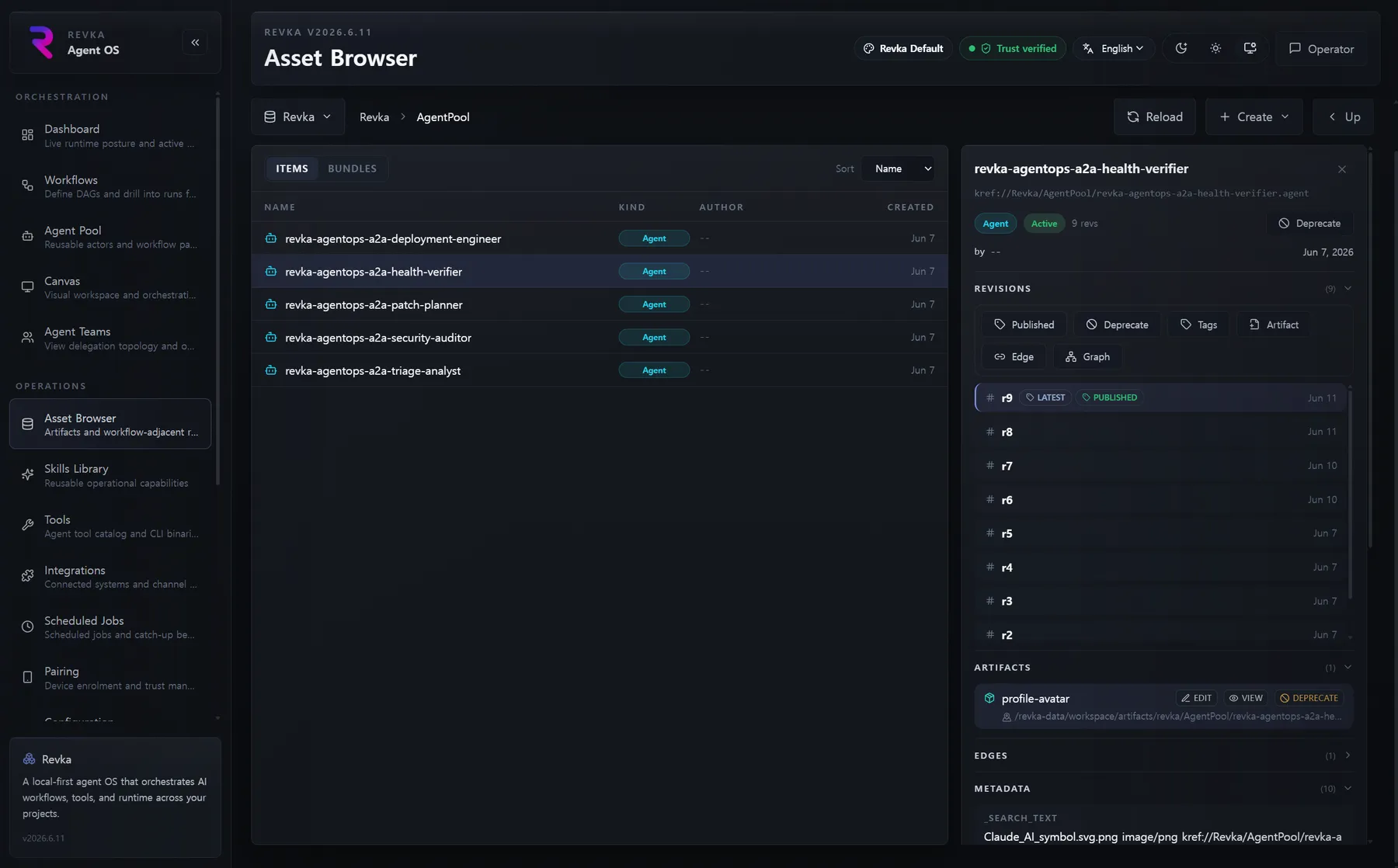
Assets page
Section titled “Assets page”Navigate to /assets from the Operations section of the sidebar. The page is a Kumiho asset manager: it lets you browse and create projects, spaces, items, revisions, artifacts, bundles, and edges, with a force-directed dependency graph, an artifact content editor, revision tagging, and bundle membership management.
You can deep-link to a project with the ?project=<name> query parameter:
/assets?project=CognitiveMemoryThe Kumiho hierarchy
Section titled “The Kumiho hierarchy”The Assets page mirrors Kumiho’s data model. Use the breadcrumb to drill down and back up:
project → space → item → revision → artifact| Level | What it is |
|---|---|
| Project | The top-level container (for example CognitiveMemory for memories, Revka for operational data). |
| Space | A hierarchical folder inside a project that scopes related items. |
| Item | A single addressable thing — a decision, fact, skill, document — identified by a kref. |
| Revision | An immutable version of an item. Editing produces new revisions rather than mutating old ones. |
| Artifact | A file attached to a revision (a markdown note, an image, a report). |
Each level fetches on demand as you navigate:
GET /api/kumiho/projectsGET /api/kumiho/spaces?parent_path=<path>GET /api/kumiho/items?space_path=<path>&kind=<kind>GET /api/kumiho/revisions?item_kref=<kref>GET /api/kumiho/artifacts?revision_kref=<kref>Authorization: Bearer <token>These reads go through the read-only Kumiho proxy. Writes go through the typed /api/assets/* routes described below.
Creating entities
Section titled “Creating entities”Each entity type has its own create modal — project, space, item, bundle, revision, artifact, edge, and tag. Creates map directly to the typed Asset Browser write API:
POST /api/assets/projects { "name": "CognitiveMemory" }POST /api/assets/spaces { "parent_path": "/CognitiveMemory", "name": "Decisions" }POST /api/assets/items { "space_path": "/CognitiveMemory/Decisions", "item_name": "chose-grpc", "kind": "decision" }POST /api/assets/revisions { "item_kref": "kref://CognitiveMemory/Decisions/chose-grpc" }POST /api/assets/artifacts { "revision_kref": "<rev kref>", "name": "NOTES.md", "location": "<absolute path or remote uri>", "content": "..." }Authorization: Bearer <token>A search bar runs a text search across the items in the current project so you can jump to an item without walking the tree.
Node kinds & edge types
Section titled “Node kinds & edge types”When you create an item, you set its kind — the semantic label Kumiho uses to classify it. Kinds drive both the colours in the dependency and memory graphs and the filters you can apply. Common kinds include:
conversation, decision, fact, preference, summary, reflection, plan, synthesis, correction, error, skill, architecture, document, bundle, implementation, action, instruction, space, and skilldef.
Items are connected by typed edges that encode provenance. Edges link revision krefs, not item krefs. The edge modal on the Assets page suggests these edge types:
| Edge type | Meaning |
|---|---|
DEPENDS_ON | The target cannot start until the source completes. |
DERIVED_FROM | The target was derived from the source (auto-created from source_krefs). |
REFERENCES | A soft pointer between revisions. |
ADVANCES | The source moves the target forward. |
FORESHADOWS | The source sets up a later payoff. |
PAYOFF_TARGET | The target is the payoff a setup points to. |
UPDATES | The source updates the target. |
CONTRADICTS | The source conflicts with the target. |
BLOCKS | The source blocks the target. |
RELATED_TO | A loose association between revisions. |
RESOLVES | The source resolves the target. |
These are suggestions, not a fixed set — the edge type is a free-form string, so you can enter any value the edge modal does not pre-populate.
Create an edge from the Assets page with the edge modal, or via the API:
POST /api/assets/edges{ "source_kref": "<rev kref>", "target_kref": "<rev kref>", "edge_type": "DERIVED_FROM" }Authorization: Bearer <token>Dependency graph viewer
Section titled “Dependency graph viewer”For any selected revision, the Assets page renders a force-directed dependency graph so you can see what a node depends on and what depends on it. Three controls shape the walk:
- Direction —
upstream,downstream, orboth. - Depth — how many edge hops to traverse out from the center node (max 3).
- Edge type filter — restrict the walk to a single edge type, or show all.
The viewer is backed by:
GET /api/assets/dependency-graph?revision_kref=<kref>&direction=both&depth=2&edge_type=allAuthorization: Bearer <token>The response stops expanding after a node cap (node_limit, default 100, max 200) and sets a truncated flag when the cap is hit, so very large neighborhoods stay renderable.
Artifact editor
Section titled “Artifact editor”Click an artifact to open the artifact viewer/editor modal. It fetches the body text and renders it; for editable artifacts you can change the content inline and Save.
GET /api/artifact-body?location=<uri>PUT /api/assets/artifacts/content{ "artifact_kref": "<artifact kref>", "revision_kref": "<rev kref>", "content": "updated body" }Authorization: Bearer <token>The revision history strip shows every revision for the selected item, its tags, and which revision is published. From here you can tag, untag, publish, and deprecate:
POST /api/assets/revisions/publish { "kref": "<rev kref>" }POST /api/assets/revisions/tags { "kref": "<rev kref>", "tag": "milestone" }DELETE /api/assets/revisions/tags { "kref": "<rev kref>", "tag": "milestone" }POST /api/assets/items/deprecatePOST /api/assets/revisions/deprecatePOST /api/assets/artifacts/deprecateAuthorization: Bearer <token>Bundle manager
Section titled “Bundle manager”Bundles are Kumiho’s grouping construct — a set of items treated as a unit (a team, a canon set, a session’s captures). The bundle manager lets you create bundles, add and remove members, and view the member list with per-member kind chips.
GET /api/assets/bundles?project=<name>&space_path=<path>GET /api/assets/bundles/members?bundle_kref=<kref>POST /api/assets/bundlesPOST /api/assets/bundles/members { "bundle_kref": "...", "item_kref": "..." }DELETE /api/assets/bundles/members { "bundle_kref": "...", "item_kref": "..." }Authorization: Bearer <token>kref copy
Section titled “kref copy”Every selected entity exposes a kref copy button that copies its kref://... identifier to the clipboard. Krefs are how Kumiho addresses everything — use a copied kref to deep-link, to wire an edge, or to pass into an MCP tool or API call. The format is kref://<project>/<space>/<item>?r=<N>, where the optional ?r=N selector pins an exact revision.
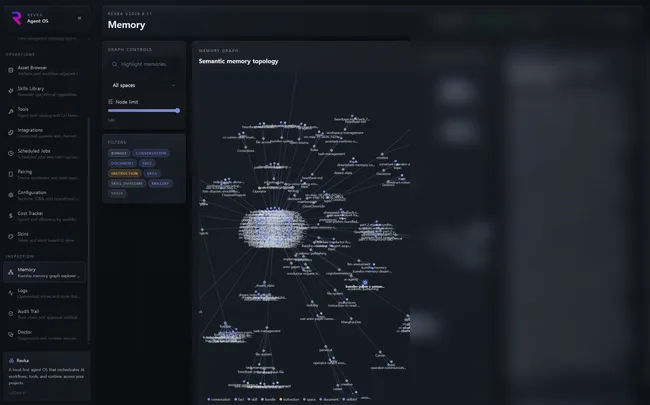
Memory / knowledge graph page
Section titled “Memory / knowledge graph page”Navigate to /memory from the Inspection section of the sidebar. (The legacy /memory-auditor URL redirects here.) This page renders an interactive 2D force-directed graph of the Kumiho memory graph: each node is a memory item coloured by its kind, and edges show how they relate. Use it to audit what your agents have remembered and how it all connects.
Loading and filtering the graph
Section titled “Loading and filtering the graph”The graph is fetched in a single aggregated payload:
GET /api/memory/graph?limit=100&kinds=decision,fact&space=CognitiveMemory/SkillsAuthorization: Bearer <token>| Param | Type | Default | Meaning |
|---|---|---|---|
limit | int | 100 (max 500) | Maximum number of items to include — controlled by the node-limit slider. |
kinds | string | — | Comma-separated kind filter, set by the kind chips. |
space | string | — | Space-path prefix filter, set by the space dropdown. |
The filter panel on the left lets you:
- Filter by kind — toggle the kind chips to narrow the node set.
- Filter by space — pick a space from the dropdown to scope the graph.
- Set the node limit — drag the slider between 25 and 500 nodes.
- Search — type in the search box to highlight matching nodes (the input is debounced; matches are highlighted rather than removed).
Node kinds & colours
Section titled “Node kinds & colours”Nodes are coloured by kind so clusters are visible at a glance. The same kinds you set on the Assets page appear here, grouped by colour family — for example conversation, skill, architecture, and document share one family; decision, action, and instruction another; correction and error are flagged as danger; and bundle/implementation are highlighted as live. Edges carry the same provenance types as the dependency graph (DEPENDS_ON, DERIVED_FROM, REFERENCED, CONTAINS, CREATED_FROM, BELONGS_TO, SUPERSEDES, MEMBER, USED_TEMPLATE).
Inspecting a node
Section titled “Inspecting a node”Click any node to open its detail in the right rail. The rail shows the node’s metadata (title, summary, kind, space, creation time) and a kref copy button for the node’s revision kref. For bundle nodes, the rail also resolves and lists the bundle’s members:
GET /api/kumiho/revisions?item_kref=<kref>GET /api/kumiho/bundles/members?bundle_kref=<kref>Authorization: Bearer <token>- Open
/memoryand wait for the graph to load. - Narrow the set with the kind chips, the space dropdown, or the node-limit slider.
- Find a node by typing in the search box; matches are highlighted in place.
- Click the node to inspect its metadata in the right rail.
- Copy its kref to deep-link it, wire an edge on the Assets page, or pass it to an API call.